
Appearance
Frequently Asked Questions
Account & Access
I forgot my password. How do I reset it?
Go to the login page and click Forgot Password. Enter your email address and follow the instructions sent to your inbox. See Forgot Password for the full steps.
My session expired. What happened?
For security, sessions expire after a period of inactivity. You will see a countdown warning before being signed out. Simply sign in again to continue.
I have multiple accounts. How do I switch?
If your email is linked to more than one account, a selection dialog appears after signing in. Choose the account you want to use. You can also switch at any time without signing out: click your avatar in the top bar and pick a different account under Selected Account. See Multiple Accounts.
Map & Layers
What are layers?
The map you see is made up of one or more spatial layers all overlaid on top of each other. Each layer represents and communicates data in an easy to understand way.
To illustrate the concept of layers, think of each layer as a transparent page that can be placed on top of each other, each with its own points, lines or polygons. The final image that you see projected would be made up of all the different transparencies combined. It’s as simple and easy as that! Each layer is like one of these transparent pages, all working together to form the final map you see on your screen.
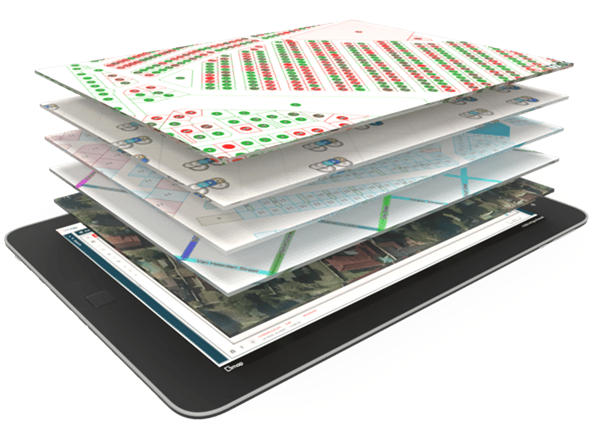
The reason for doing this is simple: by grouping similar spatial objects (e.g. road centrelines, erven cadastre, or suburb boundaries) each into its own spatial layer, the user can create a customised map with only the data relevant to their specific application. This enables users to add an extraordinary amount of data to their map, without crowding it to such an extent that it loses its usefulness. For more on working with layers, see Layer Control.
Why can't I see my layer on the map?
Check the following:
- The layer's visibility checkbox is enabled in the layers panel
- You are at the correct zoom level - some layers only display within certain zoom ranges
- The layer has data within the current map extent
How do I change the base map?
In the layers panel, scroll to the Base Layers group and select a different base layer using the "eye" icon.
How do I add more layers to my workspace?
Click the Add Layers button () in the layers panel toolbar to open the Layer Repository.
Data Table
I can't edit cells in the Data Table. Why?
Inline editing requires:
- An edit template selected in the toolbar dropdown
- Edit permission granted by your administrator
- The field must be included in the edit template
How do I export my data?
Use the Export button in the top toolbar to export the active layer's data. See Export Layers for the full wizard.
Imports, Exports & Jobs
Can I cancel an import or export that is still running?
Yes. Open the Import Jobs or Export Jobs dialog (the arrow next to the Import/Export button) and click Cancel on the running job. See Background Jobs.
What happens if I close my browser during an import or export?
Nothing is lost - the job keeps running on the server. You will still receive the completion email, and you can reopen the application later to download the result from the jobs dialog.
Why does my map video recording take so long to export?
Video export renders every frame of the recorded map animation, so longer recordings and larger map areas take proportionally longer. Keep recordings short for quick results.
Bookmarks
What does restoring a bookmark do to my workspace?
Restoring a bookmark temporarily loads the bookmark's layers, map position, and panel layout. Your workspace is not permanently changed unless you save it afterwards.
General
How do I change the language?
Open your Profile (click your avatar in the top bar, then Profile), click Edit Profile, and change the Language field. Some deployments also offer a quick language selector in the top bar. See Profile Settings.
How do I switch between the light and dark theme?
Click the theme toggle (moon/sun icon) in the top navigation bar. Your choice is remembered for your next visit.
How do I switch between Metric and Imperial units?
The unit system is configured at the application or account level by your administrator. The current units are displayed in the bottom toolbar of the map.