
Appearance
Forgot Password
If you cannot remember your password, you do not need anyone's help to get back in - as long as you can read email at the address your account uses. Ask for a link, open it, choose a new password.
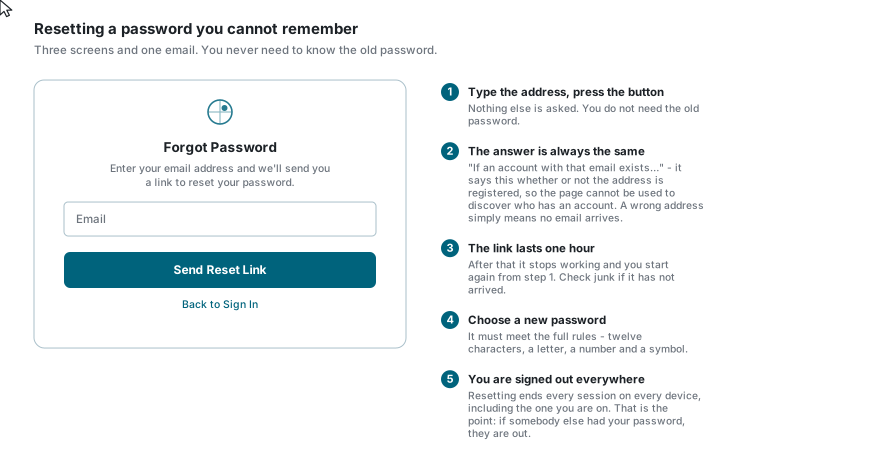
Asking for the link
- On the sign-in page, click Forgot Password? under the password box.
- Type the email address your account uses. Nothing else is asked, and you do not need your old password.
- Click Send Reset Link.
The page then says:
Check Your EmailIf an account with that email exists, we've sent you a password reset link. Please check your inbox.
Why it says "if"
That message appears whatever you type - a registered address, a stranger's, or one with a typo. If the page confirmed a real address and denied an unknown one, anyone could use it to work out who has an account here. So a mistyped address simply results in no email arriving, with no other clue.
Opening the link
Look in your inbox for Reset your password, and check junk and spam as well. Click the Reset Password button in it.
The link is good for one hour
After that it stops working. Nothing is broken - go back to the sign-in page and ask for a new one. The same happens if you use a link twice; each one works once.
Choosing the new password
Enter the new password twice and press Reset Password. It must meet the full password policy:
- at least 12 characters
- at least one letter
- at least one number
- at least one symbol (
!@#$%^&*and friends) - and not one of the handful of very well-known passwords
Stricter than registration
Registration only enforces the 12-character minimum. A reset enforces all of it, so a password that was accepted when you signed up may be refused here. See Registration.
When it succeeds you see Password Reset Successful!, and Go to Login takes you back to sign in.
Resetting signs you out everywhere
A completed reset ends every session on every device, including the browser you are sitting at, and cancels any API tokens issued to you.
That is the point of it rather than a side effect: if you are resetting because somebody else may have had your password, this is what removes them. It also means you will be asked to sign in again on your phone and anywhere else you were signed in.
If you cannot receive email at all
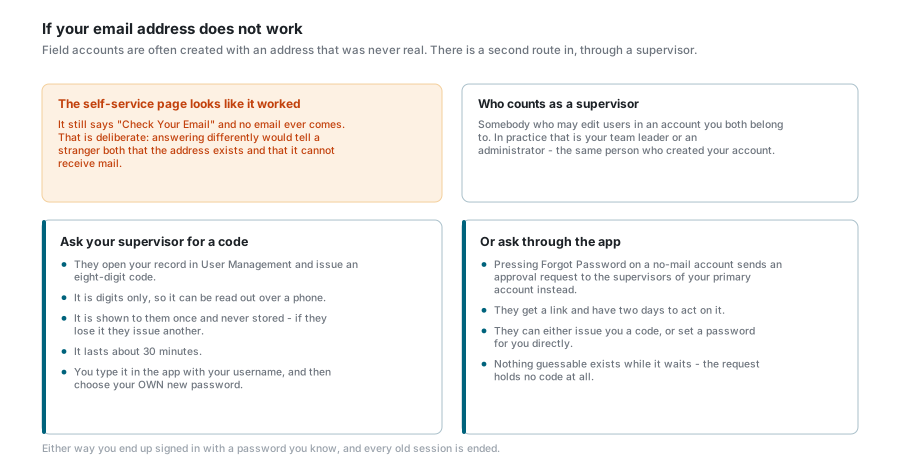
Many field accounts were created with an address that was never deliverable. If that is you, the self-service page above is a dead end - and it will still say Check Your Email, for the reason given above. No email will ever arrive.
Your route back in is through a supervisor: somebody who may edit users in an account you both belong to, which in practice is your team leader or the administrator who created your account.
They can give you a code. They open your record and issue an eight-digit code:
- digits only, so it can be read to you over a phone;
- shown to them once and never stored anywhere - if they lose it they simply issue another;
- valid for about 30 minutes;
- you type it into the app together with your username, and then choose your own new password. They never learn it.
Or they can act on a request from you. On an account that cannot receive email, pressing Forgot Password sends an approval request to the supervisors of your primary account instead of sending you a link. They have two days to act on it, and can either issue you a code as above or set a password for you directly. Nothing guessable exists while the request is waiting - it holds no code at all.
If something goes wrong
| What you see | What it means |
|---|---|
| Check Your Email, but nothing arrives | Either the address is not registered, or it has a typo, or your account is not able to receive email. Check junk first, then try the address again carefully, then speak to your administrator. |
| The link says it is invalid or expired | It is more than an hour old, or it has already been used. Ask for a new one from the sign-in page. |
| The new password is refused | A reset enforces the full policy, which is stricter than registration. Twelve characters, a letter, a number and a symbol. |
| Passwords do not match | The two boxes differ. |
| You were signed out on your phone too | Expected - a reset ends every session everywhere. Sign in again with the new password. |
| You know your password and just want to change it | You do not need this page at all. Change it from your profile while signed in. |
See also
- Sign In - signing in with the new password
- Profile Settings - changing a password you still know
- Registration - creating an account in the first place